Conducting an Interface Inventory
Brad Frost Conducting an Interface Inventory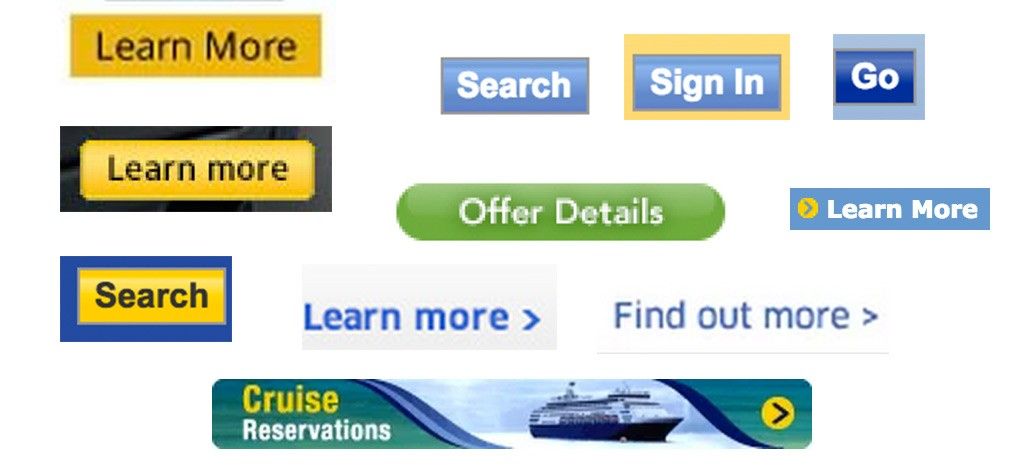
An interface inventory is similar to a content inventory, only instead of sifting through and categorizing content, you’re taking stock and categorizing the components making up your website or app.
In order to present your product or service in a cohesive and consistent manner across a slew of properties, browsers, devices, and environments, it's essential to take stock of what your interface is composed of. Documenting unique UI patterns highlights inconsistencies and sets the stage for a broader conversation about establishing a pattern-based workflow. So how do you go about conducting an interface inventory? What are the considerations to keep in mind? Here are the steps to conduct a successful interface inventory:
- Round up the troops
- Prepare for screenshotting
- Screenshot exercise
- Present findings
- Regroup and establish next steps
Step 1: Round up the troops At many workshops and consulting engagements, I've encountered folks who say something along the lines of "Oh yeah Sarah started doing an inventory of our UI." While it's great one member of the team is thinking systematically, it's absolutely essential to get everyone in an organization to participate in the interface inventory exercise. Gather a cross-disciplinary group of folks – designers, developers, project managers, business owners, QA, and really anyone that touches the experience – in a room together to conduct the interface inventory exercise together. After all, one of the most crucial results of this exercise is to establish a shared vocabulary for everyone in the organization, and that requires input from everyone. Step 2: Prepare for screenshotting This exercise requires generating a ton of screenshots, so naturally you'll need screenshotting software. Ultimately, it doesn't really matter what tool to use, but everyone involved in the exercise should agree on a tool to make it easier to combine at the end. A few options:
- Keynote/Powerpoint
- Photoshop/Sketch
- Evernote web clipper
- Google Docs
- Google Slides
Lately I've found Google Slides to be my go-to recommendation for conducting interface inventories. It provides a canvas for freeform positioning of images, it's chunked out into slides for better categorization, and it's web-based so can be shared with ease. I've created a template for you to use if you're interested. Step 3: Screenshot exercise And now for the main event, which is to document, name, and categorize unique UI patterns across the entire experience. I typically break people up into pairs and assign them a UI category or categories, but this all depends on how many people are participating. I try to timebox the screenshotting exercise to avoid going down a rabbit hole that ends up lasting all day. The amount of time to allocate will vary depending on how many people are participating, but I find between 30-90 minutes to be sufficient for a first pass of the interface inventory. So what categories of interface elements should be captured? Obviously the interface element categories are going to vary from experience to experience, but here's a few categories to potentially start with: Some Interface Inventory Categories
- Global - things like headers and footers and other global elements that are shared across the entire UI
- Navigation - primary navigation, footer navigation, pagination, breadcrumbs, interactive component controls, and basically anything that's used to navigate around a UI
- Image types - Logos, heros, avatars, thumbnails, backgrounds, etc and any other unique image pattern that shows up in the UI. I've found this of the most challenging categories to round up.
- Icons - a special type of image worthy of its own category. Capture magnifying glasses, social icons, arrows, hamburgers, spinners, favicons, and every other interface icon across the experience
- Forms - Inputs, text areas, select menus, checkboxes, switches, radio buttons, sliders, and other forms of user input
- Buttons - The quintessential UI element. Capture all the unique button patterns throughout an experience: primary, secondary, big, small, disabled, active, loading, etc
- Headings - h1, h2, h3, h4, h5, h6 and variations of typographic headings. This can be another challenging category as many elements might be considered headings
- "Blocks" - I call collections of headings and/or images and/or excerpts "blocks". These are relatively simple clusters of interface that are built for reuse (see Nicole Sullivan's write-up about the Media Object)
- Lists - Unordered, ordered, definition, bulleted, numbered, lined, striped, etc. Any collection of elements presented in a list-type format
- Interactive Components - Accordions, tabs, carousels, and other modules with moving parts
- Media - Video players, audio players and other rich media elements
- 3rd Party - Widgets, iframes, stock tickers, social buttons, anything that isn’t hosted on your domain
- Advertising - A special kind of 3rd party category which includes all ad formats and dimensions
- Messaging - Alerts, success, errors, warnings, errors, validation, in-progress, popups, tooltips, 4o4s, etc. This is a challenging category as these messages often require user action to expose, but it's essential to get messaging right.
- Colors - Capture all unique colors presented in the interface. This category can be aided by fantastic tools like CSS Stats and Stylify Me
- Animation - This is a special category as it involves capturing UI animation. This requires using screen recording software such as Quicktime to capture motion (you can capture screens in Quicktime with File > New Screen Recording).
Again, these categories aren't set in stone and will vary based on the nature of the project. Once these patterns are documented the person (or pair of people) should drop them into Google Slides and cluster them together. Now the fun part: naming these patterns. Obviously it's important to use existing conventions wherever possible, but you'll quickly find out many UI patterns either don't have names or have conflicting/confusing names. Step 4: Present Findings Screenshotting and naming can be exhausting and overwhelming, so be sure to take a break after the gathering exercise is complete. Get some food, grab some coffee, and stretch your legs. Once everyone's recharged, reconvene and spend about 10-15 minutes per category presenting the findings to the group. This is where things get interesting. Presenting to the group allows the team to start discussing the naming conventions and rationale for these UI patterns. As I do more of these exercises with teams, it's fascinating to hear that designers, developers, and product owners often have different names for the same UI pattern. Once every category has been presented and discussed, have all the participants send their slides to the exercise leader, who merges everything into one uber-document. Step 5: Regroup and Establish Next Steps The hard work is done, so now what? This exercise should be used as a conversation starter to get the entire organization on board with crafting an interface design system. The uber-document can be shopped around to stakeholders to get buy in for establishing an interface design system. The beautiful thing about seeing all the disparities of an interface laid bare for everyone to see is that it becomes crystal clear something needs done about it. In addition to selling the idea through, the interface inventory should be used as the groundwork for a future pattern library. Gather a smaller cross-disciplinary team together to go through the uber-document and have some conversations about it. Some important questions for this group to cover:
- What names should we settle on?
- What patterns should stay, and which should go?
- Can we merge patterns together easily?
- How do developers, designers, and managers begin to utilize this shared vocabulary?
- How do we translate this exercise into a living pattern library?
A Necessary First Step Interface inventories are a crucial first step for establishing deliberate design systems. While they don't guarantee long-term pattern library success, the exercise surfaces crucial conversations and can help create advocacy for pattern-based thinking across the organization. *[DETAILS]: Device, Environment, Time, Activity, Individual, Location, Social *[RESS]: Responsive Design with Server-Side Components